MACD Settings for Day Trading and Scalping

When analysing charts using technical analysis, traders tend to utilise a number of indicators. One of the most frequently used tools to understand momentum is the Moving Average Convergence Divergence (MACD) indicator.
Traders who are new to the world of technical analysis often use the default setting of the indicator. However, since MACD is a lagging indicator, its performance may vary depending on how traders configure its parameters.
Most traders often use the basic 12,26,9 setting to study daily charts. It may provide a balanced view between early momentum shifts and smooth out ultra short-term volatility.
For traders who prefer shorter timeframes such as 5-minute to 15-minute charts, they often require faster responsiveness and 8,17,9 MACD settings are sometimes preferred by traders for this purpose. Similarly, for scalping, settings such as 5,13,8 are sometimes used by traders aiming to capture quicker fluctuations. However, they tend to generate more frequent false signals and may lead to premature entries.
In this article, we will explore how traders may optimise MACD settings for different market conditions and timeframes. Not just that, we will also see how adjustments are made from fast to slow and how signal periods might help align the indicator more closely with individual trading objectives and volatility levels.
.png)
Table of Contents
- MACD: An Introduction
- Understanding MACD Settings Parameters for Trading Across Different Timeframes on MetaTrader 5
- Customising MACD Settings for Different Timeframes
- MACD Signal Line Crossover Strategy
- MACD Divergence
- MACD Settings for Forex Trading
- MACD Patterns
- Pros and Cons of Different MACD Settings
- Common MACD Settings Mistakes
- Frequently Asked Questions
MACD: An Introduction
MACD stands for Moving Average Convergence Divergence. It is a trend-following and trend-capturing momentum indicator. It indicates the relationship between two moving averages on the chart.
MACD was developed by Gerald Appel during the late 1970s. The MACD formula is derived from a calculation of the difference between the 26-day Exponential Moving Average (EMA) and the 12-day EMA.
A 9-day EMA of the MACD is referred to as the signal line and is drawn over the MACD and typically denotes triggers for buy and sell signals. The setting we described is the default setting. The purpose behind the indicator is to help traders determine potential changes in market momentum.
Most, if not all, charting software, such as MetaTrader 4 and MetaTrader 5, come equipped with the MACD, so there is no need for independent downloads or custom coding. What matters more is how the indicator is configured. The choice of which MACD setting a trader opts for can influence the number, speed, and reliability of signals produced.
To understand it better, let’s take an example. The traditional 12,26,9 setting is often used by swing traders on higher-timeframe charts such as daily or four-hour. It tends to smooth out volatility, helping traders filter out short-term noise.
In this scenario,
- The first number is for the faster EMA, which tracks more recent price movements (e.g., the 12 in 12,26,9).
- The second number is for the slower EMA, which covers a longer period to show a smoother trend (e.g., the 26 in 12,26,9).
- The third number is the signal line, which is an EMA of the difference between the fast and slow EMAs. This line provides the buy and sell triggers (e.g., the 9 in 12,26,9).
This is how the standard MACD indicator looks on the chart:
.png)
Other configurations which are commonly used by the traders include 8,17,9 MACD settings, which are preferred by some traders for intraday. Similarly, 5,13,8 MACD settings are often used by the traders for short-term trading or scalping.
But since markets respond differently in terms of timeframes and volatility conditions, there is no one best setting. Traders commonly modify the MACD parameters to suit their preferred timeframe, asset class, and risk tolerance.
For a trader, grasping how MACD settings affect signal timing and frequency may be equally as valuable as interpreting the indicator itself. Moreover, a proper configuration based on your needs and risk tolerance may help you interpret market momentum more effectively across varying market environments.
Understanding MACD Settings Parameters for Trading Across Different Timeframes on MetaTrader 5
Let’s look at a few components which together form the MACD indicator. On the MetaTrader platform, the MACD is built using three parameters. These are the Fast EMA, the Slow EMA, and the Signal line.
1. Fast and Slow EMAs
The first and most important configuration parameters are the fast and slow exponential moving averages (EMAs). The difference between these two represents the momentum in price.
- When the fast EMA moves away or diverges from the slow EMA, it may indicate increasing momentum in the direction of the move.
- When the two EMAs move closer together or converge, it is often interpreted as indicating weakening momentum or a possible trend pause.
Most traders just leave these at their default settings, but some traders often fine-tune them for faster or slower signals based on their trading strategy.
Let’s move to the second parameter.
2. MACD signal line
The signal line is actually an average of the MACD itself. Under the default setting, the signal line is usually a 9-period EMA.
If a trader increases this value, the signal line will smooth out and stay further away from the histogram. That means fewer crossovers (fewer potential buy or sell signals).
Traders often interpret the signal line this way.
- When the MACD histogram rises above the Signal line, it is often interpreted as the faster EMA is gaining strength over the slower one (region between the green lines in the image below). It is sometimes interpreted as early bullish momentum.
- When the histogram shifts downward, it may indicate weakening strength or possible bearish momentum (highlighted area between the two red lines in the image below).
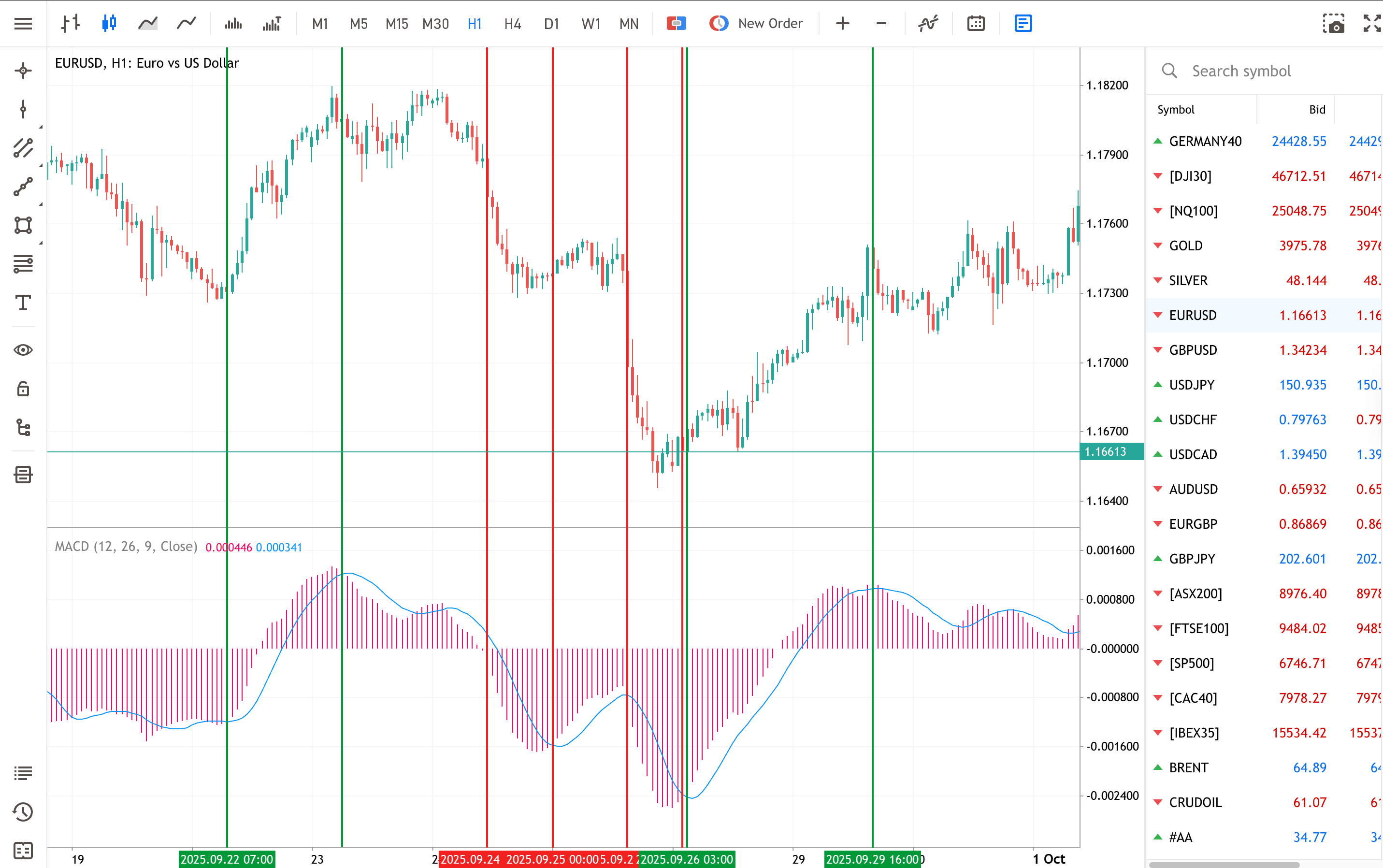
Although the signal line and histogram may provide indications of a potential change in momentum, traders tend to use these along with support and resistance levels or trendlines for confirmation, since breakouts can happen during market reversals in low-volume or sideways markets.
It is also good to note that on MetaTrader, the MACD display can differ slightly from how it appears on other trading platforms. Some platforms plot a separate MACD line and zero line, while platforms like MetaTrader use only the histogram and signal line. Despite this difference, the underlying logic remains the same.
When selecting parameters, traders often test combinations to see which may align with volatility and momentum in a given market.
But it’s important to bear in mind that MACD settings can vary by asset class and timeframe. Rather than assuming one ideal configuration, many traders might want to test settings in a demo account first to understand how signal sensitivity changes.
Customising MACD Settings for Different Timeframes
Traders don’t always use the standard version of MACD that we have discussed up until now. There are 1-minute, 5-minute and 15-minute MACD settings as well.
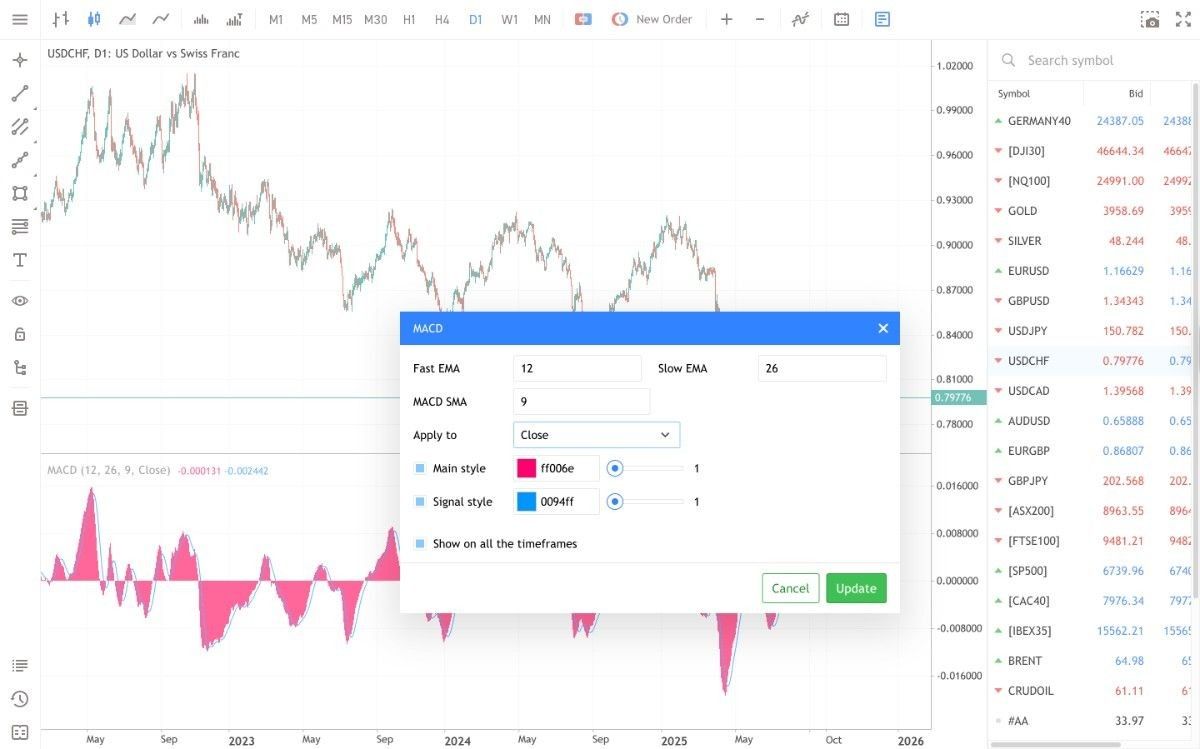
Changing the MACD settings is straightforward. Click on the setting beside the indicator, and a screen like this will appear where settings can be changed.
1-Minute Chart MACD Settings
The 1-min chart is often used by some scalpers with the aim to closely study and capture potential price changes in a short span. So, they tend to prefer faster MACD settings such as 5,13,8 or 8,17,9. Shorter EMAs are often used by some traders because they react more quickly to price changes, making momentum shifts easier to identify. But as these signals appear very frequently, there is a high possibility that they may be less reliable. That’s why scalpers usually don’t rely on the MACD alone. They often combine it with analysing volume spikes and price action indicators to confirm the strength of a move before reacting.
MACD Settings for 5-Minute Chart
In a 5-minute timeframe, traders seek moderately fast settings and a bit of a signal reliability, so they may use 8,17,9 or even the standard 12,26,9 MACD settings.
If we compare this setting with the 1-minute chart, signals on a 5-minute chart tend to be a bit less frequent. Traders might also look at the 15-minute trend direction to see whether their 5-minute MACD signals appear to align with broader market momentum. Still, this does not eliminate the possibility of inconsistent or conflicting signals.
15-Minute Chart MACD Settings
The 15-minute chart is often used by intraday traders who prefer holding positions for a few hours rather than just for seconds or minutes.
Here, traders typically go for standard or moderately slower settings like 12,26,9. This is often used with the intention of smoothing short-term signals, often when compared with 1-minute or 5-minute charts.
Many traders also use the 1-hour or 4-hour chart as a higher timeframe filter. If the larger trend supports the direction shown by the 15-minute MACD, the signal gains more weight. However, false signals are possible in this setting as well.
MACD Settings for Daily Chart
On a daily timeframe, traders focus on broader trends and overall market bias rather than quick momentum swings.
The standard 12,26,9 MACD setting is commonly used for daily chart, though some traders may also go for a slightly slower EMAs like 19,39,9 for smoother signals. Some may also combine daily signals with 15-minute or 1-hour charts to confirm direction before entering positions, improving trade consistency and reducing false signals.
MACD Signal Line Crossover Strategy
One of the most common MACD trading approaches is the Signal Line Crossover strategy, also known as the MACD Crossover strategy.
The Signal Line is a 9-period EMA of the MACD Line, meaning it reacts more slowly and typically lags behind the MACD Line’s movements.
- A bullish crossover occurs when the MACD line turns upwards and crosses beyond the signal line.
- A bearish crossover occurs when the MACD turns downwards and crosses under the signal line.
When this occurs, most traders search for both lines to get farther away from one another, as this can indicate that the price momentum may still go in the same direction.
Using the MACD and looking for a crossover remains one of the most common ways traders apply the indicator. However, it is important to note that crossovers are not always reliable and should ideally be combined with other forms of analysis or confirmation tools before making trading decisions.
MACD Divergence
Understanding MACD convergence and divergence (sometimes called the MACD divergence trading strategy) is very important. Divergence can be of two types.
Bullish Divergence
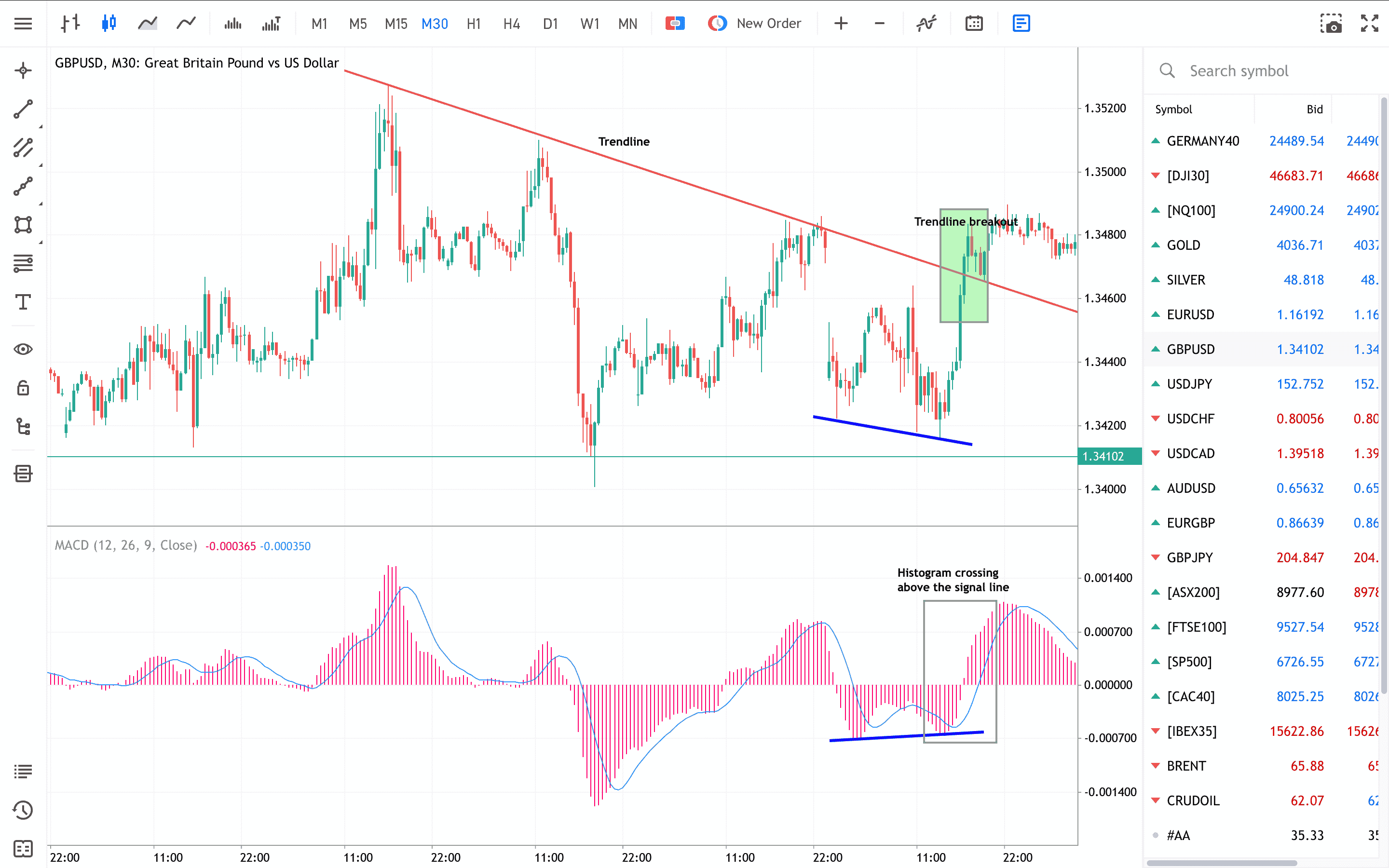
When the price is forming a lower low, but the MACD histogram forms a higher low, or when the price has a flat base, then the traders call this bullish divergence. In the example below, the histogram crosses the signal line upwards, indicating fading bearish momentum and possibly the beginning of the bullish phase, supported by the breakout of the trendline. Please not that past performance is not a reliable indicator of future results. Trading involves risk, and no indicator can guarantee profitable outcomes.
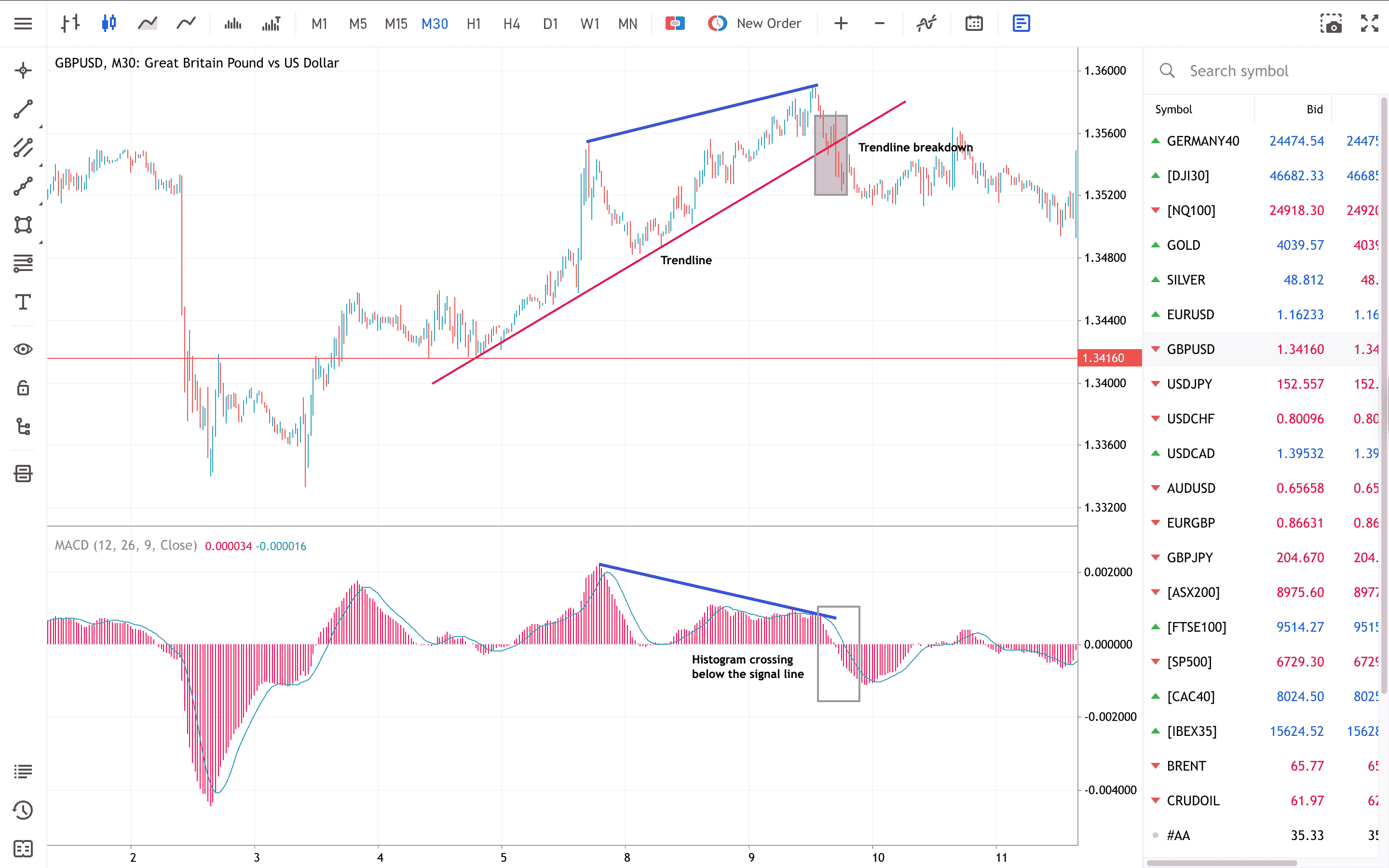
Similarly, when the price is making a higher high, but the MACD histogram is making a lower high, or if the price forms a flat top, traders often refer to this as bearish divergence. In the example below, the histogram drops below the signal line, indicating fading bullish momentum and potentially the beginning of a bearish trend, which is confirmed by the breakdown of the trendline.
Divergence often tends to follow immediately after a sudden price move, up or down. It is a possible indication that the price may reverse, and it would usually be confirmed by a break of a trendline or other collaborating indicators. Such signals may play a crucial role in a MACD-based swing trading strategy, helping traders identify possible turning points in market momentum.
With suitable MACD indicator settings for day trading, understanding concepts such as convergence and divergence may help traders interpret market behaviour, although this does not guarantee improved outcomes.
High Volatility MACD Adjustments
At high volatility times, the standard MACD settings tend to respond too impulsively or generate too many false signals. To control this, it is possible to tweak the MACD parameters to filter out the noise and make the signals more reliable.
For instance, raising the slow EMA period marginally or expanding the gap between the slow and fast EMAs can decrease the sensitivity to sudden spikes in price. Similarly, extending the signal line period can help filter out sudden reversals that occur in volatile conditions. These adjustments make the MACD to react gradually, helping traders to identify genuine changes in momentum and not respond to every swing in the market.
But it is good to keep in mind that high volatility can magnify both potential profits and losses. Hence, traders prefer to test MACD configurations in a demo account before applying them in real trades.
MACD Settings for Forex Trading
When trading Forex, the MACD indicator settings often need to be adapted based on the currency pair and the trading session. For example, in the case of major pairs like EURUSD or GBPUSD, the standard settings of 12,26,9 may work well for daily and 4-hour charts. However, for exotic pairs, the market tends to be more volatile, and traders often increase the slow EMA or signal line period to reduce noise.
Session specific adjustments can also improve reliability. For example, during high-liquidity periods like London or New York trading sessions, MACD may produce faster signals; traders may slightly widen EMA gaps to avoid false crossovers. Conversely, during low volume sessions, standard settings may suffice.
Remember that no single configuration guarantees success and combining MACD with proper risk management may help traders navigate Forex volatility more effectively.
MACD Patterns
When traders apply MACD settings of 5,13,1 instead of the standard 12,26,9, they may achieve a clearer visual representation of potential MACD patterns. These patterns can often be used within various trading strategies as an additional filter that might help identify possible trade setups.
Let’s look at a few patterns.
MACD Bullish SHS (Inverted Head and Shoulders)
The image below illustrates how a bullish SHS pattern is often *interpreted* as indicating a potential reversal and uptrend. Some traders interpret this pattern as a potential change in momentum and may look for possible entry points once they believe the pattern has completed, such as at the open of the next bar.

MACD Bearish SHS (Head and Shoulders)
The Bearish SHS pattern (Head and Shoulders) may indicate a reversal and a possible turn to a downtrend. Traders often consider potential entry points after the pattern is interpreted as completed, at the open of the next bar.

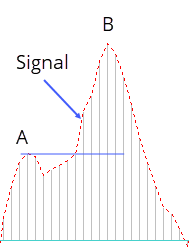
MACD Bullish Continuation
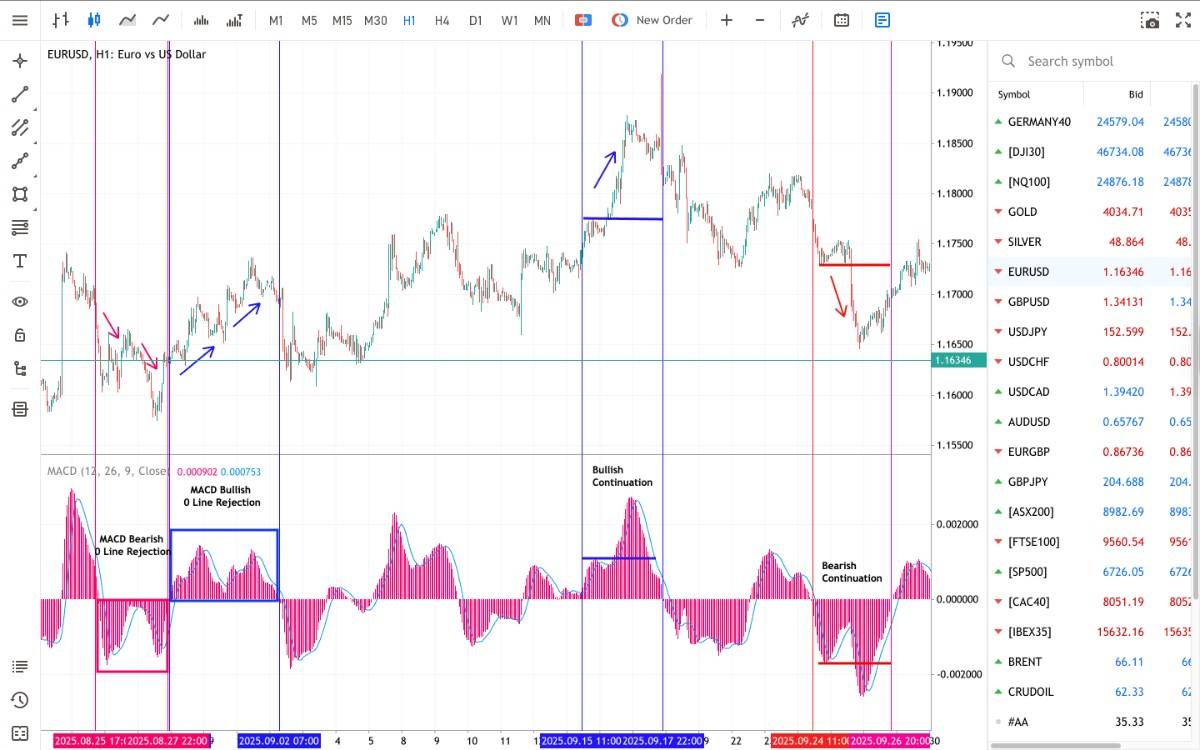
Some traders interpret MACD bullish continuation pattern as a potential signal for trend continuation. The MACD first makes a downside turn from point A (retracement). When point A is broken by the histogram, some traders may *interpret* this as a potential signal for a long entry.
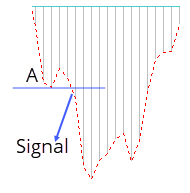
MACD Bearish Continuation
Some traders interpret a MACD bearish continuation pattern as a potential indication of trend continuation. The MACD first makes an upside turn from point A (retracement).
When point A is broken by the histogram, some traders may interpret this as a potential signal for a short entry.
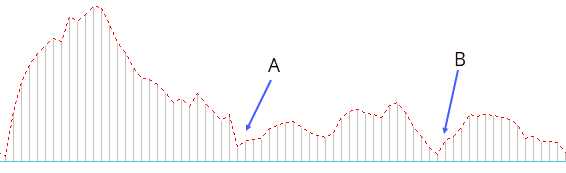
MACD Bullish 0 Line Rejection
When the MACD approaches the zero line and turns back up just above it, some traders interpret this as a possible trend continuation signal. Points A and B mark the potential uptrend continuation.
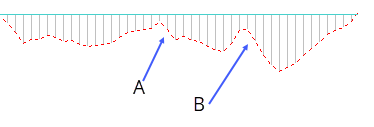
MACD Bearish 0 Line Rejection
When the MACD approaches the zero line and turns back down just below it, this may indicate a downtrend continuation. Points A and B mark the potential continuation move.
This is an example of how the above patterns could be identified and used for trading.
Pros and Cons of Different MACD Settings
Let’s look at a few benefits and drawbacks of different MACD settings.
Common MACD Settings Mistakes
If you are planning to test different MACD settings, or any technical indicator, it’s recommended to test it on a demo account. It allows you to see how different configurations work under real market conditions, without risking your capital.
You can open a free demo account with Admirals by clicking on the banner below.
Articles that might interest you
- Bull and Bear Power Indicators
- What is the Elliott Wave Forex Theory?
- The Top Forex Technical Indicators
Frequently Asked Questions
What is the MACD Indicator?
MACD stands for Moving Average Convergence Divergence, which is a trend-following momentum indicator representing the relationship between two moving averages of a financial instrument's price. It is derived by subtracting the 26-period Exponential Moving Average (EMA) from the 12-period EMA. The result of that calculation is the MACD line. A nine-day EMA of the MACD, called the signal line, is then plotted on top of the MACD line. This combination may help traders identify potential changes in price momentum.
How Do You Interpret the MACD Indicator?
The MACD indicator is often used to observe the strength, direction, momentum, and duration of a price trend. When the MACD line crosses above the signal line, it may suggest potential bullish momentum, while a cross below may indicate possible bearish momentum. Additionally, if the MACD line diverges significantly from the price movement, it might signal that a trend reversal could be developing.
However, as with any indicator, no signal is guaranteed, and results may vary across different market conditions.
Can the MACD Indicator Be Used for All Trading Instruments?
The MACD indicator is used across a wide range of trading instruments like forex, stocks, commodities, and indices. It can be utilised on multiple trading styles like day trading, swing trading, etc. With that in mind, please consider that the MACD might work better in trending markets, whereas it will produce false or late signals in the case of range-bound markets.
For better accuracy, traders use MACD in combination with other technical tools and risk management techniques before making any trading decision.
What are the top MACD settings for day trading?
For day trading, some traders prefer faster MACD settings, such as 12,26,9 or 8,17,9, as they may react more quickly to intraday price movements. These configurations may help capture short-term shifts in momentum. However, faster settings may also produce more frequent but less reliable signals. So, risk management remains essential.
How do I adjust MACD settings for different timeframes?
MACD settings can be adjusted depending on the time horizon of your trades. Shorter timeframes, like the 5-minute or 15-minute charts, may work better with smaller EMA values to react faster to price changes. Longer timeframes, such as daily or weekly charts, often use slower settings to reduce noise and highlight broader trends.
Should I use different MACD settings for volatile markets?
Yes, during high-volatility periods, traders may consider wider or slower MACD settings, such as 16, 35, 9, to filter out excessive noise and false breakouts. Slower settings may help provide clearer signals, though they can also delay entries and exits slightly compared to standard configurations.
What's the difference between 12,26,9 and 8,17,9 MACD settings?
The 12,26,9 setting is the default setting. It gives a fair balance between speed and reliability.
The 8,17,9 setting, on the other hand, reacts faster to price changes, which may be preferred by active traders seeking early momentum cues. However, faster signals can sometimes lead to less accuracy in sideways markets.
About Admirals
Admirals is a multi-award-winning, regulated Forex and CFD broker, offering trading on over 8,000 financial instruments via the world's most popular trading platforms: MetaTrader 4 and MetaTrader 5.
The given data provides additional information regarding all analysis, estimates, prognosis, forecasts, market reviews, weekly outlooks or other similar assessments or information (hereinafter “Analysis”) published on the websites of Admirals investment firms operating under the Admirals trademark (hereinafter “Admirals”) Before making any investment decisions please pay close attention to the following:
- This is a marketing communication. The content is published for informative purposes only and is in no way to be construed as investment advice or recommendation. It has not been prepared in accordance with legal requirements designed to promote the independence of investment research, and that it is not subject to any prohibition on dealing ahead of the dissemination of investment research.
- Any investment decision is made by each client alone whereas Admirals shall not be responsible for any loss or damage arising from any such decision, whether or not based on the content.
- With view to protecting the interests of our clients and the objectivity of the Analysis, Admirals has established relevant internal procedures for prevention and management of conflicts of interest.
- The Analysis is prepared by an analyst (hereinafter “Author”). The Author Amrita Kundu is a contractor for Admirals. This content is a marketing communication and does not constitute independent financial research.
- Whilst every reasonable effort is taken to ensure that all sources of the content are reliable and that all information is presented, as much as possible, in an understandable, timely, precise and complete manner, Admirals does not guarantee the accuracy or completeness of any information contained within the Analysis.
- Any kind of past or modelled performance of financial instruments indicated within the content should not be construed as an express or implied promise, guarantee or implication by Admirals for any future performance. The value of the financial instrument may both increase and decrease and the preservation of the asset value is not guaranteed.
- Leveraged products (including contracts for difference) are speculative in nature and may result in losses or profit. Before you start trading, please ensure that you fully understand the risks involved.